
How AI-native teams build a long-term AI work system
A practical field guide for turning OpenAI and Anthropic updates into model evaluation, permission boundaries, long-running pipelines, reusable content assets, and weekly operating reviews.

The real problem is not model access
The last two years trained teams to chase every model update. A new coding benchmark appears, a new image model becomes more controllable, an agent demo runs for hours, and suddenly the whole workflow feels outdated.
That anxiety is understandable. Model capability is moving fast. But the hidden cost is that small teams keep rebuilding around tools instead of building an operating layer above them.
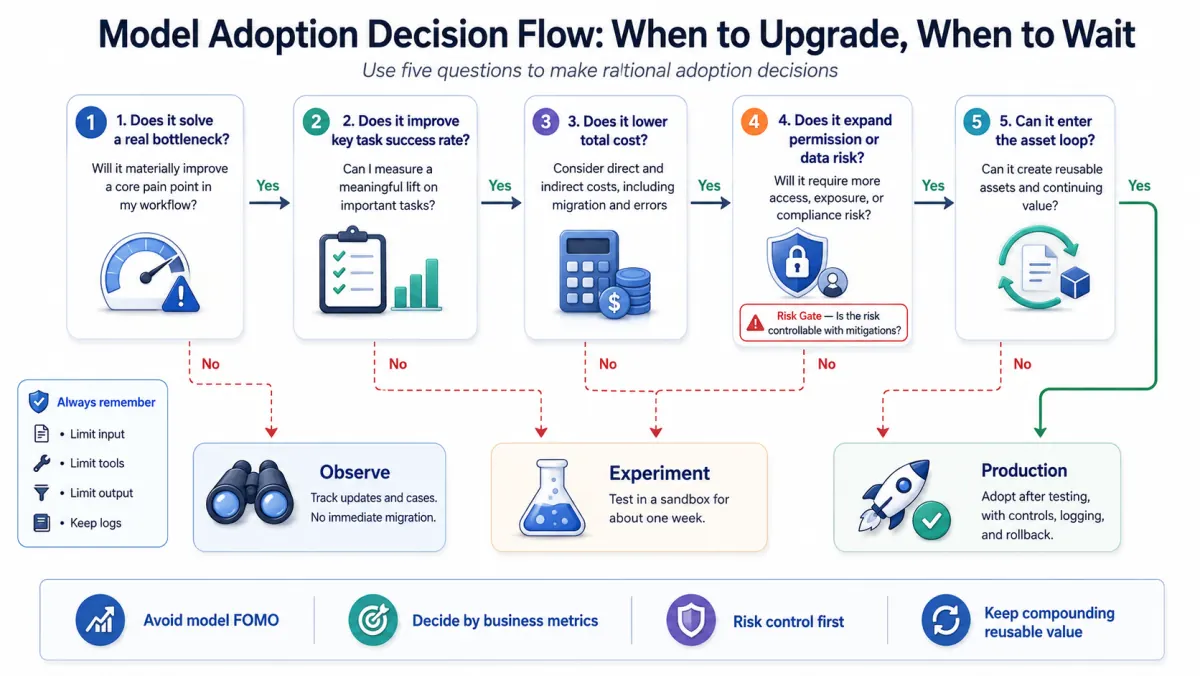
The better question is not “Should we use the newest model?” It is:
Can our team evaluate the model, test it on real work, constrain its permissions, review its output, and reuse what it produces?
For AI-native teams, the durable advantage is not knowing every model announcement first. It is having five things in place: an AI work constitution, clear permission boundaries, long-task pipelines, a content and knowledge asset loop, and a weekly review rhythm.
A few things to get right first
- Treat models as replaceable execution layers, not the strategy.
- Evaluate every model update against task success rate, total cost, and permission risk.
- Write an AI work constitution before expanding automation.
- Do not run long tasks through a single open-ended chat. Split them into stages.
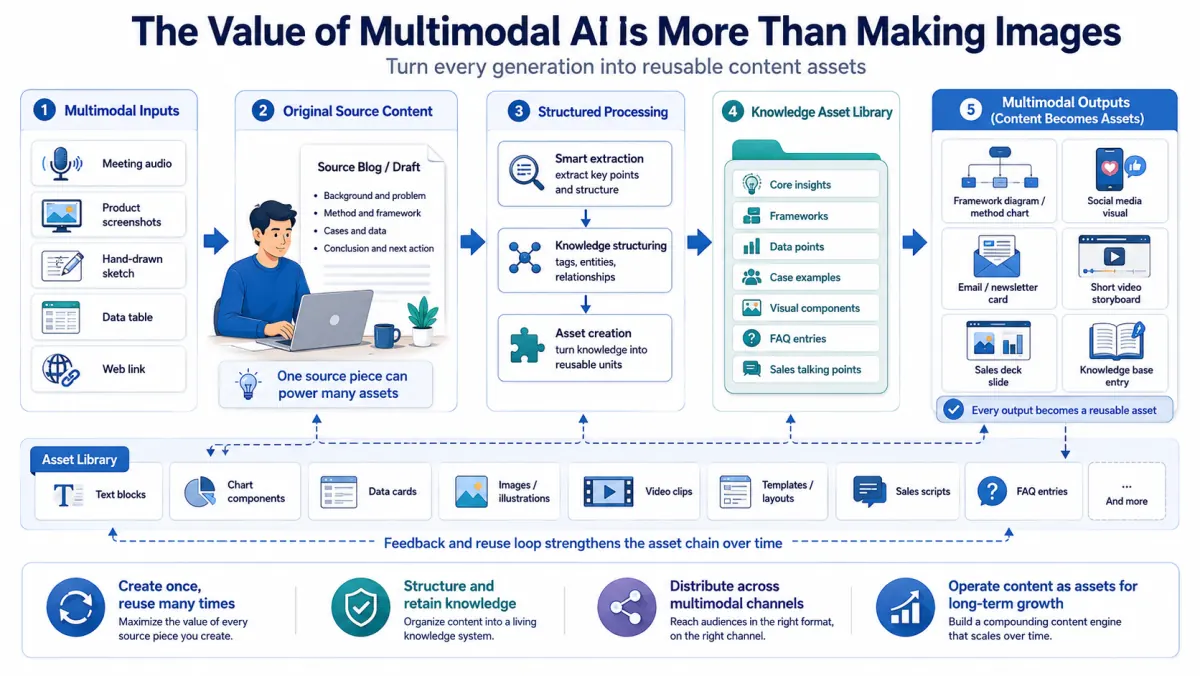
- Treat multimodal AI as a content asset chain, not just a way to make images.
- Use containment even if you are a small team: sandbox, least privilege, approval points, logging, and rollback.
- Review AI output every week: saved time, repeated errors, reusable prompts, and workflows that should be retired.
Why chasing every model update is expensive
Model upgrades have real value. They can make code work faster, improve reasoning, generate better visuals, and handle longer tasks. The mistake is assuming every improvement should immediately change production workflows.
There are three hidden costs.
First, migration cost. A prompt, tone, format, or tool-calling pattern that works in one model may not be stable in another. A more capable model may feel more reliable while still skipping a constraint in long context.
Second, evaluation cost. Most small teams do not have a benchmark set for their own work. They compare models by vibes, public demos, or social media examples. A model that is stronger on coding may not be better for sales follow-up, legal review, course scripts, or customer delivery.
Third, permission cost. Once an AI system can access files, browsers, repositories, task systems, email, or CRM data, failure is no longer just a bad answer. It can become a bad action. Anthropic’s containment writing is useful here because it frames the practical question: how large is the blast radius when the agent makes a mistake?
The correct posture is not to avoid new models. It is to put model adoption inside a decision process: observe, test with low-risk work, evaluate against real examples, define permissions, then enter production.
Write an AI work constitution
An AI work constitution is a one-page operating agreement. It answers five questions.
What can AI do? Examples include research organization, first drafts, code sketches, competitive summaries, support reply suggestions, visual concepts, and meeting-note structuring.
What data can AI not touch? Examples include identity documents, raw customer records, API keys, banking information, unpublished contracts, compensation data, private customer strategy, and copyrighted full-text material.
Which actions require human approval? Sending email, publishing articles, merging code, deleting files, changing a database, updating prices, replying to customers, and making delivery commitments should not be fully automatic by default.
How do we label output confidence? A simple three-tier system works well: A for usable with light review, B for fact-check required, C for inspiration only. Dates, prices, legal terms, news facts, and technical claims should default to B or C.
Who reviews the system? A solo operator can do this weekly. A small team should assign an owner. The point is not to criticize AI; it is to maintain the work system.
Set permission boundaries before automation
Small teams often assume permission governance is an enterprise concern. It is not. Small teams usually have fewer safety roles, fewer reviewers, and more shared accounts, so they need simple boundaries even more.
A practical four-layer model:
| Layer | Data or action | Good use |
|---|---|---|
| L0 Public | Public web pages, public docs, generic ideas | Topic research, headlines, outlines |
| L1 Internal non-sensitive | SOPs, meeting notes, project plans | Task breakdown, reporting, internal summaries |
| L2 Redacted business data | Redacted customer issues, sample tickets, code snippets | Classification, pattern finding, review suggestions |
| L3 High-risk execution | Email, production systems, databases, payments, customer channels | Only with sandbox, approval, logs, and rollback |
A useful rule: if a wrong AI action cannot be noticed and reversed within ten minutes, do not let it run automatically.
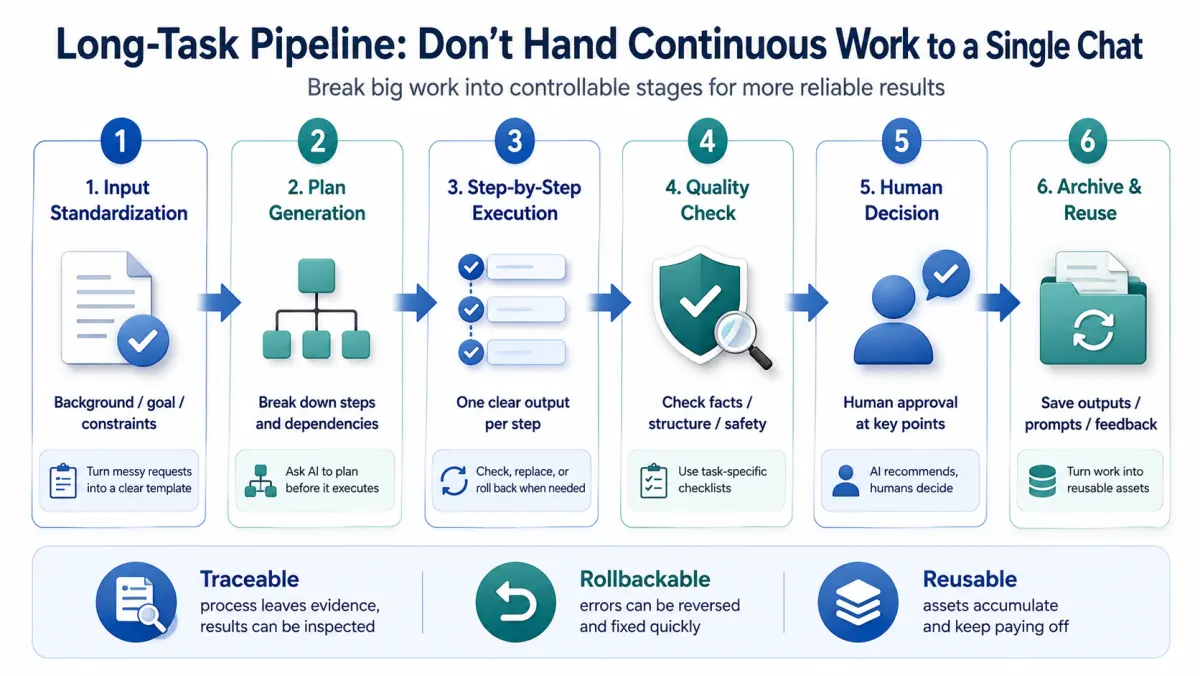
Build long-task pipelines instead of long chats
Claude Opus 4.8 and other frontier models point toward longer-running professional work. But a long-running AI task should not mean one giant chat window.
A repeatable long-task pipeline has six stages.
Input standardization: turn messy requests into a fixed template: background, goal, constraints, materials, done criteria, and risks.
Planning: ask AI to produce steps, dependencies, missing information, and human approval points before it executes.
Step-by-step execution: each step produces one reviewable artifact, such as a source table, outline, first draft, fact-check checklist, or publish checklist.
Quality review: different tasks need different checks. Articles need facts, sources, copyright, structure, repetition, and tone. Code needs tests, edge cases, and security review.
Human decision: AI can recommend, but publishing, sending, merging, deleting, pricing, and customer commitments should still have an accountable human.
Archiving: store the final output, useful prompts, source links, failure notes, and feedback. Otherwise every task looks complete while the team loses organizational memory.
Multimodal AI should become a content asset loop
Image generation is useful, but the deeper opportunity is not “make a nice graphic.” It is turning ideas into reusable content assets.
| Stage | Input or action | Goal |
|---|---|---|
| Raw input | Calls, interviews, screenshots, sketches, links, tables | Preserve real context |
| Structuring | Summaries, key points, question lists, material libraries | Make content reusable |
| Multimodal generation | Diagrams, explainers, tutorial images, social visuals | Turn ideas into shareable assets |
| Human editing | Facts, brand, copyright, taste, tone | Protect trust and quality |
| Distribution | Website, newsletter, LinkedIn, sales decks, internal training | Increase reach |
| Reuse | Prompts, versions, source assets, performance data | Make the next production cycle faster |
If you only generate one image, the image expires quickly. If you build an asset loop, one article can become a diagram set, a short video script, a sales page section, a newsletter, and an internal training note.
A 30/60/90 day plan
| Stage | Goal | Key actions | Deliverables | Success signal |
|---|---|---|---|---|
| 0-30 days | Controlled use | Write the AI constitution, list data boundaries, inventory current AI use, create review checklists | One-page rules, risk tiers, task list | The team knows what AI can handle and what needs human approval |
| 31-60 days | First pipeline | Pick one frequent task, split it into stages, test with real examples | Repeatable workflow, 10 test records | 30%+ less manual organizing time with reviewable quality |
| 61-90 days | Asset loop | Build a content/knowledge asset library, model test set, and weekly review habit | Asset library, evaluation table, review rhythm | A new model can be assessed in 1-2 days |
What to do this week
- List the 10 tasks you most often give to AI.
- Label each task by data risk: public, internal, redacted, high-risk.
- Write one fixed input template for a frequent task.
- Create a pre-publish checklist for AI output: facts, sources, tone, copyright, sensitive information.
- Choose 10 real examples as your model evaluation set.
- Archive the last five useful AI outputs in one folder or knowledge base.
- Decide which actions AI should never execute automatically.
- Schedule a weekly 30-minute review: saved time, mistakes, reusable assets, next improvement.
Questions teams usually ask
What is an AI-native work system?
An AI-native work system is a repeatable operating layer for using AI in real work. It includes input templates, model evaluation, permission boundaries, quality review, human approval, and asset archiving.
How should a small business evaluate a new AI model?
Use real examples from your own work. Test whether the model improves success rate, reduces total cost, lowers review time, and stays inside your permission boundaries.
What data should not be sent to AI tools?
Do not send identity documents, raw customer records, API keys, banking information, unpublished contracts, private customer strategy, internal compensation, or copyrighted full-text material unless you have a controlled, approved environment.
Why are long chats not enough for long tasks?
Long chats are hard to inspect and hard to reproduce. Long tasks should be broken into input, planning, execution, review, decision, and archive stages so each step creates a reviewable artifact.
How does AI-generated content become a long-term asset?
Save the final output, source links, prompts, versions, visuals, feedback, and performance data. The next article, sales deck, or internal guide can then reuse the work instead of starting from zero.
Do not let model updates drag your team around
AI-native does not mean using the most tools. It means building a system that can keep improving as models change.
When a model upgrades, you should be excited but not chaotic. When a tool gains more autonomy, your permissions, logs, review points, and rollback paths should mature with it. Every AI output should either ship, teach you something, or become an asset for the next cycle.
References
- OpenAI, Introducing ChatGPT Images 2.0
- OpenAI, Sharing the latest Model Spec
- Anthropic, Introducing Claude Opus 4.8
- Anthropic, How we contain Claude across products
- Anthropic, Expanding Project Glasswing